
Breve

Coming to iPhone and iPad
A study coach for language learners.
Breve plans what to review each day across all your decks, works around your class schedule, and shows you the mistakes you keep making.
One plana day
The first time you open Breve each day, it picks the cards that are due from all your decks. Cards are scheduled with FSRS. Anything you add later waits for tomorrow.
If you miss a day
Today still shows only what fits. The rest stays scheduled.
Typed answers
Breve corrects what you type letter by letter. A close misspelling counts as Almost, and you still choose the rating.
Cards you keep missing
Breve asks you to type the answer, even in a deck you normally flip.


The mistakesyou repeat
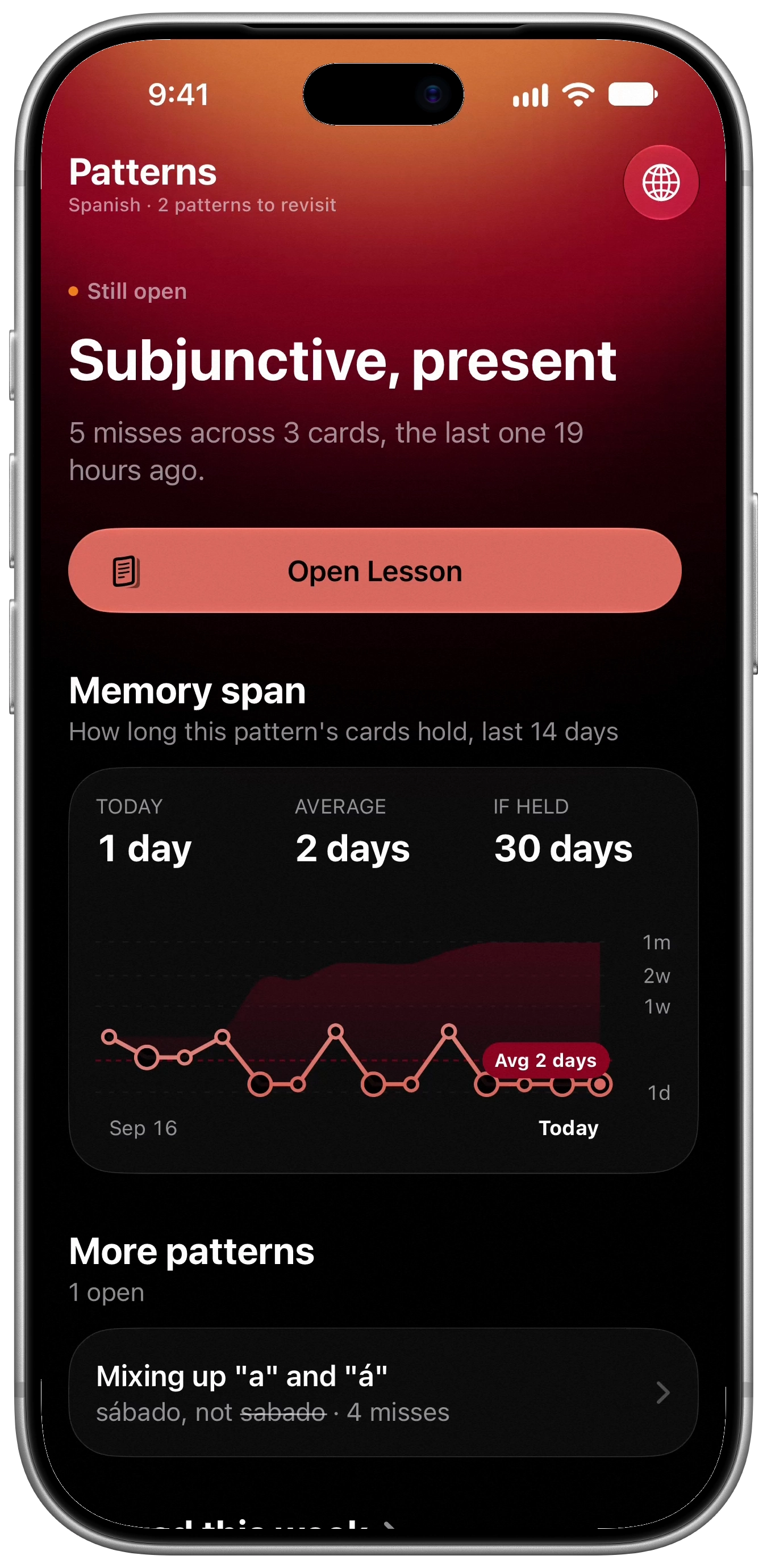
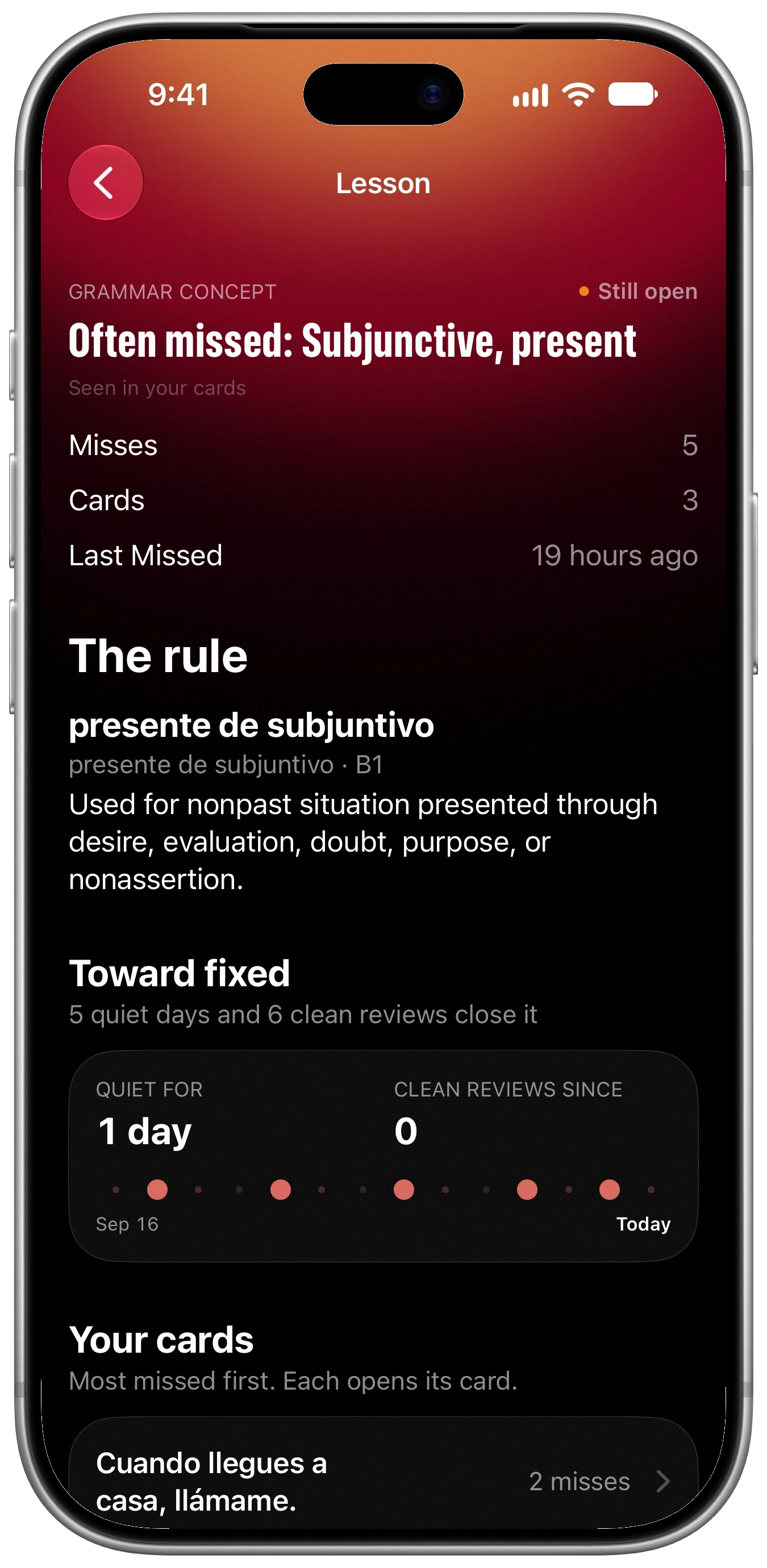
Breve keeps count of your wrong answers. When the same mistake comes up several times, it appears in Patterns with the cards where it happened. Patterns come from your answers, not from AI.
A pattern is marked fixed after 5 days without a miss and 6 correct reviews.
Grammarlessons
Breve has a grammar syllabus for every language it teaches. You open a lesson from a class or from a pattern. Lessons need Pro. You get one free lesson per language to keep.
2,104 constructions · 9 languages · 1,900 lessons
Plain version first
The plain version gives the rule in everyday words and examples. More precisely has the full explanation.
Word forms
Word Details lists a word's most useful forms. All Forms opens the full table. (Pro)
Pronunciation
IPA for single words, furigana and pitch accent for Japanese, and pinyin with tone marks for Chinese. Free.

Classes
Add your class schedule. When a class is less than a day away, Breve puts its cards first in your plan and adds a few new ones.
Recording
Breve transcribes your class on your iPhone while you record. The audio isn't saved or sent anywhere.
Grammar covered
See which constructions your class has covered, level by level, against the full syllabus.
Cards from a class
Breve reads the class's pages, notes and transcript and suggests cards, grouped by topic. You keep or skip each one. (Pro)


Cards froma handout
Pick a photo of a handout or paste an article, and Breve suggests cards from it. It handles handwriting and mixed layouts. Part of Pro.
Check each page first
You see each page before it's sent. Pages marked Keep Local stay on your iPhone.
Cover private parts
Crop a page or cover anything you don't want to send.
Choose the cards
Suggestions are grouped by topic. Edit any card, keep the ones you want, skip the rest.


Bring your decks
Import your Anki decks with their review history, scheduling, media and flags. Importing and exporting are free.
CSV and Breve packages
CSV import detects the separator and shows a preview. You can export a deck or a whole class, with or without your study history.
Both directions
If you study a card both ways, each direction gets its own schedule.


Read Aloud
Read a passage out loud in Spanish, French, Italian, Portuguese or Korean. A pace guide moves through the text as you read. Afterwards you see how each sentence went. Part of Pro.
Passages
Each language has three passages to start with. You can also read from your deck, a page, your own text or a class.
Results
You get words correct per minute. The passage marks words that weren't recognized or were said twice, and where you paused.
On your iPhone
Speech recognition runs on your iPhone. Recordings are kept only for playback on the results screen.


Outside the app
Breve also works from your Lock Screen, Control Center and Siri.
Morning Brief
Breve writes a short brief the day before and sends it at the time you choose. You can tie it to a routine, like after coffee. (The AI coach's version needs Pro.)
Study alarm
Set the morning prompt to Alarm and it rings even in a Focus mode. Opening it starts Study.
Widgets and Control Center
Widgets show today's plan on your Home and Lock Screen. Quick Study in Control Center opens your most due deck.
Your data
There's no Breve account and no Breve server. Your cards and study history sync through your own iCloud, and studying works offline. Class audio is never saved or sent.
In the app
Dictionaries, grammar data and the counting behind Patterns are built in. None of it uses AI.
On your device
Some features use Apple's on-device model. That stays on your iPhone.
Apple's Private Cloud Compute
Some Pro features, like writing new cards for a deck, run there. Apple can't read what's sent and doesn't keep it.
Cloud AI, with your permission
With Pro, pages and class material go to Breve's Cloud AI only after you allow it. Free users never use it.
Free and Pro
Studying is free. Pro adds the features that use AI.
Free
- Every deck and card
- Anki and CSV import
- The daily plan and Study
- Typed answers and Patterns
- Pronunciation
- One grammar lesson per language
- Class recording and transcripts
- Morning Brief, widgets and Siri
Pro
- Cards from photos and text
- Cards from a class
- New cards written for a deck
- Grammar lessons and word forms
- Practice sentences for a pattern
- The AI coach and translation
- Read Aloud
Pro is a subscription, with a free trial if you're eligible. Prices are set in the App Store in your currency.

Coming to iPhone and iPad
Free to study.